- Project page
- Tutorial[1]
- Repo[2]
The tutorial creates an Entity class hierarchy with x, y, char, color. I decided to have two different structures:
- The static data is what’s the same for every entity of the same type (e.g. orc). This data will not go into the save file. If you save a game where the orc is drawn in green, and then the next version of the game draws the orc in blue, you’ll see it in blue when you load that file.
- The dynamic data is potentially different for every entity of a type. For example, each orc has its own
xandy. This data does go into the save file.
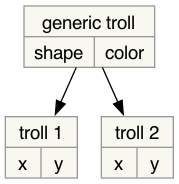
These two levels correspond to a class and object. Javascript doesn’t have a strict separation between the two. Objects can act as classes. I didn’t declare an Entity class hierarchy but instead created objects for both levels. Here are the entity types in Part 2:
/** @type{Record<EntityType, EntityData>} */
const ENTITY_DATA = {
    player: {shape: "@", fg: "hsl(60 100% 50%)"},
    troll:  {shape: "T", fg: "hsl(120 60% 50%)"},
    orc:    {shape: "o", fg: "hsl(100 30% 50%)"},
};
Part 2 also creates tile types using NumPy. We need NumPy because Python is slow, and NumPy allows some algorithms to run faster. But Javascript is fast, so there’s no need for something like NumPy.
One of the things I want to try this year is using a table/spreadsheet data structure for everything. That includes tiles. I made two tables, one for entities and one for tiles. And yes, this means every tile is a row in the table. And every time I want to find a tile, I search the entire table. We’ll fix this later.
Since I’m using a table I want to see it too. I displayed the table of entities underneath the game world: