- Project page
- Tutorial[1]
- Repo[2]
Part 8 adds items and inventory. I had a lot to work on this week:
The Python tutorial spends some time refactoring earlier parts, but I skipped that. If I need to change things, I can use Jujutsu to go back to an earlier Part and change it there. The Python tutorial adds an exception thrown if a turn isn’t taken. Javascript’s exception handling is nowhere near as nice as Python’s, and I decided to just return false instead.
The Python tutorial uses the standard object-oriented representation of items and inventory, storing inventory information in two places:
- An item points to its “parent”
- A “container” holds the item
When an item is on the map:
- item.parent (type Optional[GameMap]) points to the gamemap
- game_map.entities contains item
- item.x, item.y are the location on the map
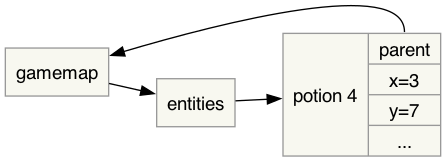
When an item is held in inventory:
- item.parent points to the inventory component (a type error!)
- inventory.items contains item
- item.x, item.y are ignored
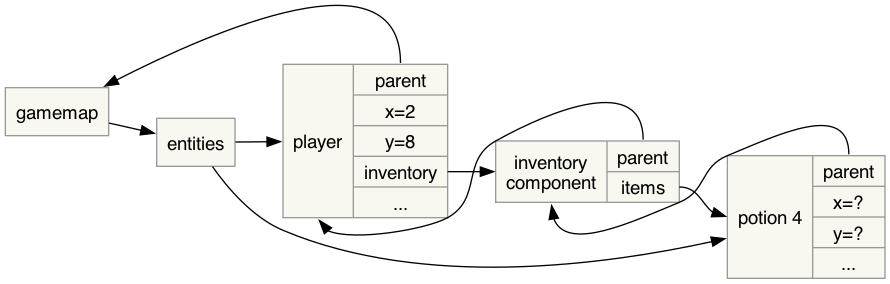
To pick up an item we modify three things:
self.engine.game_map.entities.remove(item)
item.parent = self.entity.inventory
inventory.items.append(item)
And similarly to drop an item we modify at least four things.
I’m using a different representation strategy, storing the primary information in only one place. The item’s location is a union:
- {type: 'map', x, y}
- {type: 'held', by}
- {type: 'void'}
There’s no x,y when the item is held in inventory. I use void when an item is destroyed/consumed.
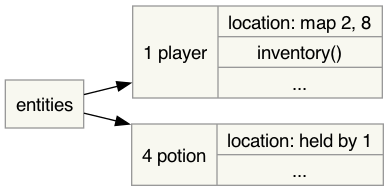
But we also want the other direction! We want to know which entities are on the map, on a tile, or in someone’s inventory. I have a “spreadsheet formula” inventory() that runs a query to find all entities held by that entity. I think it’s less error prone than manually maintaining the information. There’s an index on the location column so this query is fast:
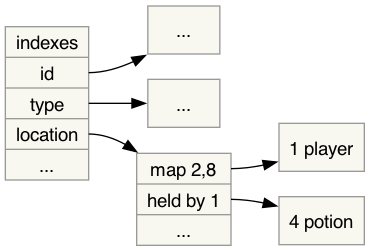
Unlike the approach shown in the tutorial, there are no cycles here. With the location information in only one place, I made the location editable in the spreadsheet. You can click on the location of a potion and change it from map 3,5 to held by 1 to pick it up. You don’t have to edit multiple pieces of information to keep them in sync. The index is automatically updated from the primary data.
I think this structure is less error prone than the conventional one.
The next big thing was to add a dialog box to select an item from the inventory.
I learned a trick from /u/Admirable-Evening128 on Reddit[3]: I can use Javascript’s async and await for the event loop. This worked out great. In the “use item” code, I can wait for an answer:
let entity = await Layer.inventory.waitForAnswer();
if (entity === null) {
    return false; // action cancelled
}
I don’t have to write a series of classes with callbacks. The await pauses execution until the dialog box gets an answer, and then resumes execution on the next line.
Part 6 had introduced the idea of event handlers, and I had decided to wait until later to decide how I wanted to implement them. I’m glad I waited, because along with the async/await, I found a nice way to handle them. I created an object with multiple layer objects inside it. The top level event handler asks each of those whether that layer is visible. If it is, it will pass events to it. Those layers objects also control whether the HTML is visible, so that the event handlers and HTML stay in sync.
Here’s the game at the end of Part 8: