These are topics that didn’t fit on the main page.
1 Layout#
In msdf-atlas-gen, the JSON file contains information about the size and layout of each character (“glyph”):
jq '.glyphs[] | select(.unicode == 65)' \
          assets/FiraSans-Regular.json
{
  "unicode": 65,
  "advance": 0.57300000000000006,
  "planeBounds": {
    "left": -0.055197810998398253,
    "bottom": -0.051254671649759741,
    "right": 0.62819781099839844,
    "top": 0.76882007474639624
  },
  "atlasBounds": {
    "left": 0.5,
    "bottom": 34.5,
    "right": 20.5,
    "top": 58.5
  }
}
What do these fields mean? From msdf-atlas-gen’s documentation[1]:
-
unicodeis the integer codepoint for the character"A". -
advanceis the horizontal advance in abstract “em” units. -
planeBoundsrepresents the glyph quad’s bounds in “em” units relative to the baseline and horizontal cursor position. -
atlasBoundsrepresents the glyph’s bounds in the atlas in pixels.
The JSON also contains general information about the font in the metrics field, but I won’t be using them for the examples on this page:
jq '.metrics' assets/FiraSans-Regular.json
{
  "emSize": 1,
  "lineHeight": 1.2,
  "ascender": 0.93500000000000005,
  "descender": -0.26500000000000001,
  "underlineY": -0.10000000000000001,
  "underlineThickness": 0.050000000000000003
}
I will need to use information about the atlas from the atlas field:
jq '.atlas' assets/FiraSans-Regular.json
{
  "type": "sdf",
  "distanceRange": 2.9265625000000002,
  "distanceRangeMiddle": 0,
  "size": 29.265625,
  "width": 192,
  "height": 192,
  "yOrigin": "bottom"
}
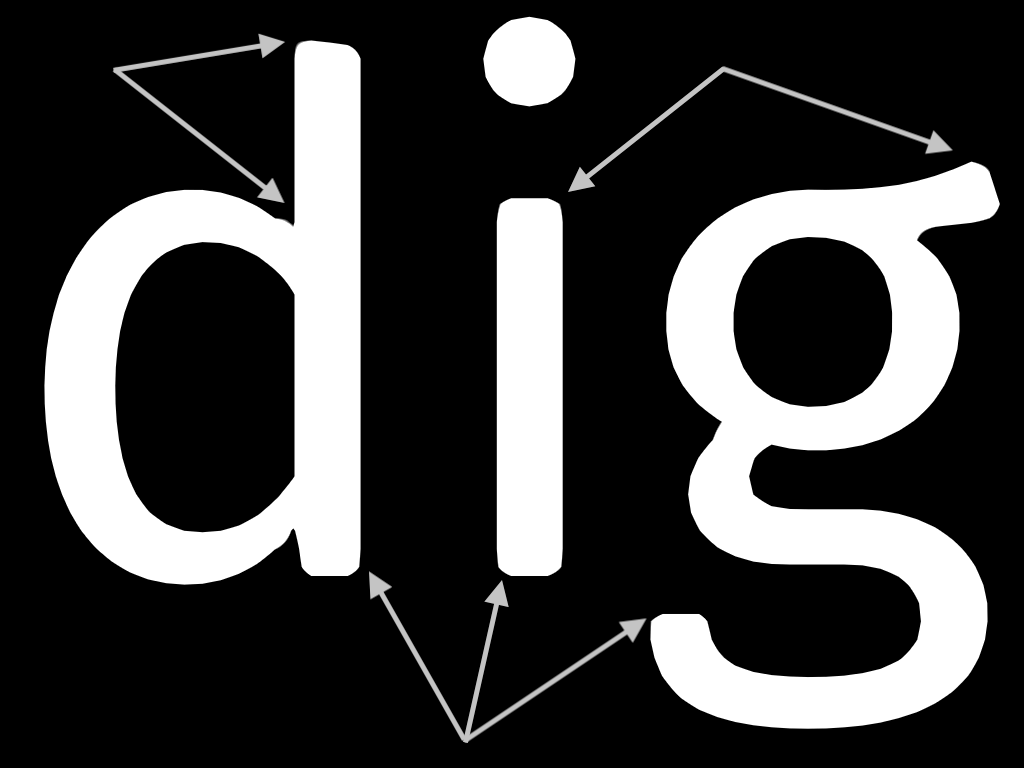
We’ll multiply the abstract “em” units by the font size to get sizes in pixels. The first step is to determine where to draw the character relative to the cursor position:
- Use
planeBounds(multiplied by font size) to determine the area to draw on the screen (blue shaded area). This will be larger than the character itself to leave room for outline effects. - The cursor location is at
x. Note that parts of the letter may be drawn to the left ofx, especially once outlines and glow effects are included. - The text baseline is at
y. Some characters like g will extend below the baseline.
Visually:
The second step is to generate rectangles where the characters will be drawn. Let’s construct a layout for the word dig which gets turned into three glyphs, d, i, g. Use advance (multiplied by font size) to increment x to draw the next character, i. There will be overlap between the drawing areas for d and i. Visually:
Suppose we have a string and a starting x,y position. We can calculate the rectangles needed for each character, as well as the corresponding atlas locations:
Let’s calculate the layout boxes for each character:
There can be overlap, and it will be more the larger your distance range (aemrange in msdfgen, differently named in each SDF library). The extra space is where the outlines, glow effects, and drop shadows go. Most characters extend slightly below the baseline but descenders like g extend well below the baseline.
I didn’t explore these topics:
- Kerning adjusts spacing between specific pairs of characters. There are multiple formats of kerning data, and msdf-atlas-gen only supports some[2].
- If drawing on multiple lines, set
xback to 0 and incrementybymetrics.lineHeight, plus some spacing. FreeType’s documentation[3] is worth a look. - Text layout may also include ligatures, stylistic variants, word break, hyphenation, justification, multiple fonts, and bidirectional text handling.
- Anything other than Western left-to-right writing systems may require more complex layout, called “text shaping”. Libraries include HarfBuzz[4] and KB[5].
2 SDF vs MSDF#
One downside of SDF fonts is mentioned in the original papers from 2006 and 2007: the corners of shapes end up rounded instead of sharp. The 2006 paper uses a relatively complex data structure to calculate the SDF in a way that keeps corners sharp. The 2007 paper suggests using multiple channels but say “As it stands, we like the rounded style of this text” so they didn’t go into details about how to keep corners sharp. The 2016 paper goes into extensive detail about how to use multiple channels.
To get sharper corners, we can either:
-
Use a higher resolution SDF:
1✕ texture size4✕ texture size16✕ texture size


SDF font atlas, increasing resolution from 256 to 1024 -
Use a multi channel distance field (MSDF, 4 channels instead of 1):
SDF 1 byte/pixelMSDF 4 byte/pixel

SDF vs MSDF at 256x256
It’s not surprising that using more texture memory increases the quality, but for a given amount of texture memory, which approach is better? Let’s compare 256✕256 MSDF (4 bytes per pixel) with 512✕512 SDF (1 byte per pixel):
The SDF has smoother curves, especially noticeable on the dot of the “i”. The MSDF has sharper corners. Neither one is a clear win. At a higher resolution, the MSDF looks better:



Rounded corners look better for some of the effects like glow and shadow.
3 Asymmetric range#
For outline/glow effects we need distances farther away from the font. In the above examples I’ve been using --aemrange -0.05 +0.05. The range depends on what effects we want:
- The low value (-0.05) depends on the maximum range we want outside the font for outline, halo, and other special effects. For example if we want an outline to be drawn between
distance_em0.0 and 0.2, then we need the low value to be -0.2 or lower. Setting it lower than necessary (e.g. -1.0) is safe but we lose quality because we’re wasting precision on values we don’t need. Since we’re defining the outlines and other effects in terms of em distances, we know what range we need. - The high value (+0.05) depends on the maximum distance inside the font, as calculated by
msdfgen. It should be higher for thicker fonts. Setting it too low (e.g. 0.01) may reduce quality because of truncation. Setting it too high (e.g. +0.4) may reduce quality because we’re wasting precision on values we don’t need. In my experiments, 0.05 was plenty for most fonts, and there isn’t that much more to be gained by trying to make it smaller.
A larger range uses more of the “value space” for outlines and less for the main font, which reduces its quality:

If the font looks bad, make sure 2/scale < atlas.distanceRange < 128 (see issue 11 on msdf-atlas-gen[6]), where atlas.distanceRange = (aemrange[1] - aemrange[0]) * atlas.size and scale is the ratio of the on-screen size to the size in the atlas. For example, if the letter A in the atlas is 32px tall, and you want to render at 16px, then scale is 0.5 and distanceRange needs to be at least 4.
The best range depends on what effects you want. Plan to experiment to find a good range for your needs. I explored this topic more on my blog.
4 Antialiasing#
- Clément Bœsch’s blog post[7] is the best reference I’ve found, with diagrams how we should construct the antialiasing ramp. It covers L1 vs L2 norm (linearstep vs smoothstep), antialias width, 2D vs 3D, linear vs srgb space.
- Some sample code will smooth from the threshold outwards (
thresholdtothreshold+width) and other code will smooth from the threshold in both directions (threshold-width/2tothreshold+width/2). My gut feeling is that both directions is more correct, but outwards may look better sometimes by making small fonts thicker. - Some shaders
smoothstepinstead of linear step. My gut feeling is that linear step is more correct, but smooothstep may be emulating the effect of gamma correction. - Some SDF shaders use
dFdx,dFdyinstead offwidth. In my tests I did not see any meaningful difference, especially withprecision highp float. - Dark on light text vs light on dark text may require adjusting the thickness slightly, especially for small fonts.
- If using gamma correction, several articles suggest a gamma of 1.4–1.5 may work better than the “true” gamma of 2.2–2.3.
- https://news.ycombinator.com/item?id=48521925[8] - HN comment that says sRGB isn’t perceptually linear, and 1.4 is probably closer
- but Steven’s Power Law[9] about human perception says brightness follows an exponent between ⅓ and ½, which would be gamma between 2 and 3
- and some articles say the 1.4 is because computer fonts are designed to partially compensate for gamma, not that 1.4 is the actual gamma
- I’ve read in multiple places that gamma correction is important. However, when I tried it myself, I had a hard time telling an improvement. Maybe my code or math was buggy.
-
https://acko.net/blog/subpixel-distance-transform/[10] says
The “blurry text” that some people associate with anti-aliasing is usually just text blended with the wrong gamma curve, and without an appropriate bleed for the font in question.
In Use.GPU I prefer to use gamma correct, linear RGB color, even for 2D. What surprised me the most is just how unquestionably superior this looks. Text looks rock solid and readable even at small sizes on low-DPI.
- https://news.ycombinator.com/item?id=42191709#42192825[11] says don’t worry about fonts being tuned for non-gamma-correction, and make sure antialiasing is linear not smoothstep
- https://blog.johnnovak.net/2016/09/21/what-every-coder-should-know-about-gamma/#antialiasing[12] says Photoshop uses gamma 1.42 instead of 2.2
- https://www.puredevsoftware.com/blog/2019/01/22/sub-pixel-gamma-correct-font-rendering/[13] recommends gamma 1.43 instead of 2.2
-
https://hikogui.org/2022/10/24/the-trouble-with-anti-aliasing.html[14] says something different. It says to blend in linear space, but compensate for lightness, not by changing gamma but using something different:
I will show why a pixel wide white line and a black background will visual look like a pixel wide line after anti-aliasing in linear-RGB color space
At this point you may think, okay… anti-alias instead in the sRGB color space. The sRGB’s transfer function (gamma), by design, already approximates the perceived lightness.
This will actually work, up to a point. Many font rendering engines do this, probably after having experimented with linear anti-aliasing and not getting the desired results. And even image editors used to compose in a similar non-linear color spaces in the past.
However instead of a uniform gradient between the foreground and the background the colors may get seriously distorted.
However I think the code is just converting back to something close to srgb.
-
https://github.com/kovidgoyal/kitty/pull/5969#issuecomment-1426707968[15] the Kitty terminal also has a thickness adjustment based on the contrast between the background luminance (
underL) and foreground luminance (overL):// Apply additional gamma-adjustment scaled by the luminance difference, the darker the foreground the more adjustment we apply. // A multiplicative contrast is also available to increase sasturation. over.a = clamp(mix(over.a, pow(over.a, text_gamma_adjustment), (1 - overL + underL) * text_gamma_scaling) * text_contrast); -
Patrick Walton @pcwalton says on Twitter[16] :
For posterity: Seems that default glyph dilation on macOS is min(vec2(0.3px), vec2(0.015125, 0.0121) * S) where S is the font size in px
- https://www.reddit.com/r/gamedev/comments/2879jd/comment/cicatot/[17] says to use supersampling for small font sizes; I have not had good luck yet, and probably need to change my shader more
- I had a lot of trouble getting things to look right, and I am not the only one https://x.com/rygorous/status/512371399542202368[18]
I tried various supersampling and gamma settings here:
5 Using msdfgen#
I’m using msdfgen[19], a c++ command line tool. It generates both SDF and MSDF output. The companion project msdf-atlas-gen[20] generates a font atlas and a JSON file with the layout information. On Windows, get a binary from msdf-atlas-gen/releases[21]. On Linux or Mac, compile it from source. First install cmake and vcpkg:
-
On Mac,
cd ~/Projects/src brew install cmake vcpkg export VCPKG_ROOT="$HOME/vcpkg" git clone https://github.com/microsoft/vcpkg $VCPKG_ROOT -
On Ubuntu Linux,
sudo apt update sudo apt -y install curl git cmake zip build-essential pkg-config libfreetype-dev export VCPKG_ROOT="$HOME/vcpkg" git clone https://github.com/microsoft/vcpkg.git $VCPKG_ROOT (cd $VCPKG_ROOT; ./bootstrap-vcpkg.sh) -
On Fedora Linux,
sudo yum install -y git vcpkg zip cmake source /etc/profile git clone https://github.com/microsoft/vcpkg.git $VCPKG_ROOT -
On Amazon Linux,
sudo yum install -y git vcpkg zip cmake
export VCPKG_ROOT="$HOME/vcpkg"
git clone https://github.com/microsoft/vcpkg.git $VCPKG_ROOT
(cd $VCPKG_ROOT; ./bootstrap-vcpkg.sh)
Then build the binary with:
git clone https://github.com/Chlumsky/msdf-atlas-gen.git
cd msdf-atlas-gen
git submodule update --init
cmake .
make
If that fails with a skia error, try:
cmake -DMSDF_ATLAS_USE_SKIA=OFF .
make
To update the software later:
cd msdf-atlas-gen
git pull
git submodule update
cmake . --fresh
make
I used this command to generate the texture atlas (.png file) and the layout data (.json file):
mkdir -p assets
~/Projects/src/msdf-atlas-gen/bin/msdf-atlas-gen \
    --font fonts/FiraSans-Regular.otf \
    --type sdf --aemrange -0.05 +0.05 --dimensions 192 192 \
    --imageout  assets/FiraSans-Regular.png \
    --json      assets/FiraSans-Regular.json
I used a low resolution SDF for the diagrams on this page. Depending on what sizes you render at and what effects you want, you will want a higher resolution and/or MSDF instead of SDF. See the section on rounded fonts for a comparison.
6 My pages#
The goal of my project was to increase the contrast between the text and the map https://somethingaboutmaps.wordpress.com/2021/06/01/on-edges/[22]
Cartography community calls several of these “halos”:
- outline
- fade/feather
- blur https://somethingaboutmaps.wordpress.com/2021/05/19/blurring-backgrounds-to-improve-text-legibility/[23]
- median filter https://ica-proc.copernicus.org/articles/6/4/2024/ica-proc-6-4-2024.pdf[24] - didn’t implement
- selectively applying https://somethingaboutmaps.wordpress.com/2018/10/28/smart-type-halos-in-photoshop-and-illustrator/[25]
- drop shadow
- knockout - remove other high contrast edges (requires these to be in a separate layer so we can mask them)
While I was learning and experiment, I wrote several pages and blog posts:
- /x/2403-distance-field-fonts/
- /x/2404-distance-field-effects/
- /x/2405-text-effects/
- /x/2414-font-distortion/
- /x/2428-map-typography/
- /x/2437-msdfgen-parameters/
- /x/2440-parameter-dragging/
- /x/2445-srgb-webgl/
- /blog/2024-03-21-sdf-fonts/
- /blog/2024-03-27-distance-field-effects/
- /blog/2024-03-30-text-effects/
- /blog/2024-04-13-testing-font-code/
- /blog/2024-05-31-font-distortion/
- /blog/2024-08-20-labels-on-maps/
- /blog/2024-08-27-sdf-font-outlines/
- /blog/2024-09-08-sdf-font-spacing/
- /blog/2024-09-22-sdf-antialiasing/
- /blog/2024-09-27-sdf-combining-distance-fields/ - glow/shadow overlap problem with adjacent characters
- /blog/2024-10-09-sdf-curved-text/
- /blog/2024-11-08-sdf-headless-tests/
- /blog/2024-11-17-sdf-headless-tests/ - determine what aemrange I need
- /blog/2024-12-08-sdf-halos/
7 TODO Other pages#
{TODO need to organize and prune this list}
https://github.com/Blatko1/awesome-msdf[26] - is indeed awesome as its name suggests - lots of resources, including shaders with thickness, outlines, glow, drop shadow, gamma correction, plus links to discussions
wrappers around msdfgen:
- msdf-atlas-gen[27]
- msdf-bmfont-xml[28]
- glyb[29]
- glyph-gen[30]
- msdf-bmfont[31]
other implementations
-
https://github.com/solenum/msdf-c[32] - msdf in c, “this is in an unstable state”, uses stb_truetype underneath
- https://github.com/pjako/msdf_c[33] - fork, also says “this is in an unstable state”
- https://github.com/Blatko1/msdfont[34] - msdf in rust, incomplete
- https://github.com/nyyManni/msdfgl[35] - msdf runs on the gpu! much faster than msdfgen, may not handle all features of truetype
other links
- https://medium.com/@evanwallace/easy-scalable-text-rendering-on-the-gpu-c3f4d782c5ac[36] -
- https://wdobbie.com/post/gpu-text-rendering-with-vector-textures/[37] - reads font beziers in the fragment shader, webgl1 demo
- https://osor.io/text[38] - had been using msdf, switched to rendering from the bezier curves directly, made text sharper (but I didn’t see a comparison screenshot)
- https://infinitecanvas.cc/guide/lesson-015#msdf[39] - plus, references at the end
- https://github.com/servo/pathfinder[40] uses gpu compute shaders, which should be faster than sdfs, and better quality at small sizes
- https://www.youtube.com/watch?v=_sv8K190Zps[41] - Raph Levien’s talk about 2D vector rendering, including fonts; uses more vertex shader time than an atlas but uses less fragment shader time, especially at larger font sizes
- https://www.qt.io/blog/text-improvements-in-qt-6.7[42] - SDF fonts get artifacts at larger sizes
- https://axleos.com/writing-a-truetype-font-renderer[43]
- https://github.com/behdad/glyphy[44] - Glyphy uses SDF but not encoding distances in a texture
- https://app.media.ccc.de/v/39c3-the-art-of-text-rendering[45] - a talk given in 2025, overview of text rendering approaches, says MSDF is the simplest of the “main players in 2025”
- https://blog.pkh.me/p/47-text-rendering-and-effects-using-gpu-computed-distances.html[46] - computes the SDF on the GPU instead of the CPU
non distance field based approaches:
-
Slug[47] “renders text and vector graphics on the GPU directly from Bézier curve data without the use of texture maps containing precomputed or cached images of any kind”, with MIT licensed shaders (but not the rest) https://github.com/EricLengyel/Slug[48]
- I found a webgl demo https://news.ycombinator.com/item?id=47624691[49]
- Pathfinder[50] - “Pathfinder 3 is a fast, practical, GPU-based rasterizer for fonts and vector graphics using OpenGL 3.0+, OpenGL ES 3.0+, WebGL 2, and Metal.”
- Scanline Sweeper[51]
- Windfoil[52] - “This builds on prior work (Slug, Vello, Pathfinder, font-rs and others), and may or may not be a novel algorithm.”
Other shaders I looked at:
- the Valve paper from 2007 - uses smoothstep, has outlines and drop shadows and glow
- https://github.com/maltaisn/msdf-gdx/blob/master/lib/src/main/resources/font.frag[53] - uses linearstep, has shadows
- https://github.com/maplibre/maplibre-gl-js/blob/main/src/shaders/symbol_text_and_icon.fragment.glsl[54] - halo
- https://www.shadertoy.com/view/XtdSRs[55] - border
- https://github.com/qt/qtlocation-mapboxgl/blob/upstream/master/src/mbgl/programs/gl/symbol_sdf_text.cpp[56] - halo
- https://drewcassidy.me/2020/06/26/sdf-antialiasing/[57] does antialiasing by using the screen space derivative of the distance field but msdf distance fields have discontinuities, so it’s better to use the derivative of the texture coordinate
-
https://blog.frost.kiwi/analytical-anti-aliasing/[58] says that
fwidth()is just an approximation, and that it’s more accurate to getlength(vec2(dFdx(dist), dFdy(dist))); https://bgolus.medium.com/the-best-darn-grid-shader-yet-727f9278b9d8[59] says that too; however in my experiments it didn’t make a difference, especially withprecision highp float - https://old.reddit.com/r/gamedev/comments/2879jd/just_found_out_about_signed_distance_field_text/ci88v9q/[60] says sdf gradient gets lost with small font sizes, and that setting 0 threshold higher might help (but setting it lower is what we want for glow), and supersample not on pixels but on input space? need to re-read this
- https://mapbox.s3.amazonaws.com/kkaefer/sdf/index.html[61] has a shader. Their “gamma” is antialias edge width, not actually gamma correction.
- pixi’s BitmapText https://github.com/pixijs/pixijs/blob/dev/src/scene/text/sdfShader/shader-bits/mSDFBit.ts[62] - uses gamma 2.2 correction, linear step
- pixi-msdf-text https://github.com/soimy/pixi-msdf-text/blob/master/src/msdf.frag[63], has outlines and shadows
- OGL https://oframe.github.io/ogl/examples/?src=msdf-text.html[64], uses msdf-bmfont, smoothstep, fwidth
- webgpu https://webgpu.github.io/webgpu-samples/?sample=textRenderingMsdf#msdfText.wgsl[65] - uses dFdx/dFdy instead of fwidth, and smoothstep instead of linearstep
- glyb https://github.com/larkmjc/glyb/blob/trunk/shaders/msdf.fsh[66] - uses dFdx/dFdy instead of fwidth, linearstep
- shader-wgsl https://github.com/jinleili/sdf-text-view/blob/master/shader-wgsl/text.wgsl[67] - uses dFdx/dFdy instead of fwidth, smoothstep
- monoMSDF https://github.com/roy-t/MSDF/blob/master/MonoMSDF/Content/FieldFontEffect.fx[68] - uses dFdx/dFdy instead of fwidth, uses gamma 2.2 correction, smoothstep
- Troika https://github.com/protectwise/troika/blob/main/packages/troika-three-text/src/TextDerivedMaterial.js[69] - uses fwidth, uses smoothstep
- Nice article about SDF rendering https://mccloskeybr.com/articles/font_rendering.html[70] - uses smoothstep, not clear how it sets the smoothing parameter